A few years ago, a Pilates studio owner came to me completely overwhelmed.
She knew she needed a website, but every time she tried to start, she got stuck in decision fatigue.
- What platform should I use?
- What if I mess something up?
- What if it doesn’t look professional?
Because of that, she kept postponing it. Weeks turned into months, and she was losing potential clients. Her business was growing, but without a website she was practically invisible online.
A few weeks later, her website was live, running smoothly, and bringing in new class sign-ups without any tech headaches.
What changed?
We followed a simple, step-by-step process for launching a small business website quickly, without overcomplicating anything.
If you have been avoiding building your website because it feels too technical, too time-consuming, or just overwhelming, here is the good news.
You do not need to be a web designer to launch a website.
You do not need months to do it.
You can have a professional, high-converting website live in about two weeks.
The most important mindset shift is this: done is better than perfect.
Your website is not something you create once and never touch again. It should grow and evolve with your business. The goal is to get it live, start attracting clients, and improve it over time.
Step 1: Plan first, build later
Most people make the mistake of jumping straight into design, themes, and plugins without thinking about what the website actually needs to do. That usually leads to confusion and wasted time.
Start with strategy first. Everything else becomes much easier after that.
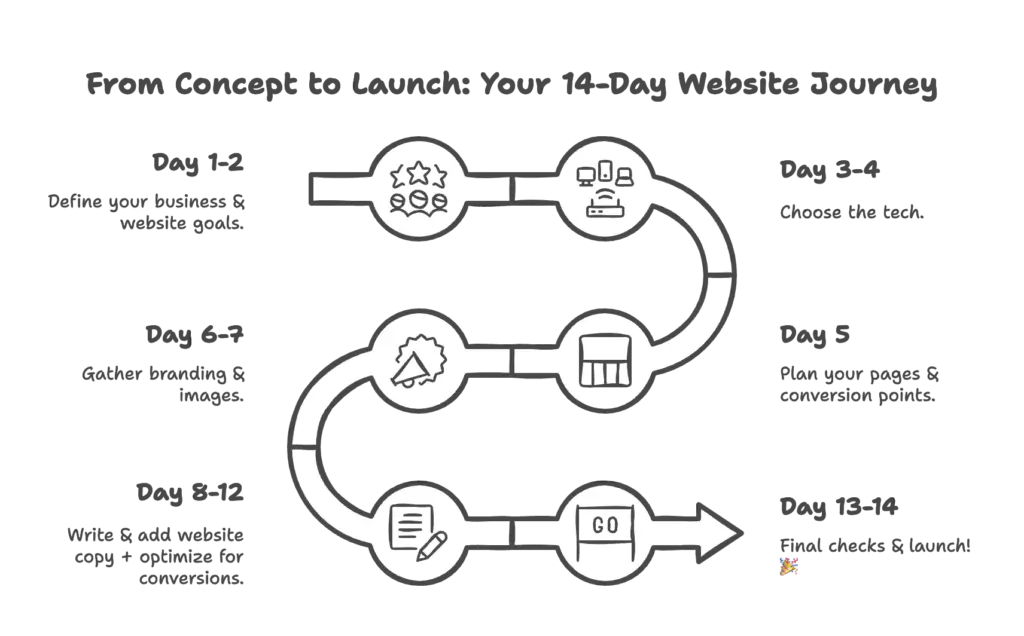
Day 1–2: Get clear on your business and your goal
Before choosing a platform or template, you need clarity about your business and how the website fits into it.
Ask yourself these three questions.
1. What exactly do you offer
Be specific. Are you a tattoo artist specializing in fine line work? A dentist focused on cosmetic treatments? A personal trainer working with women over 40?
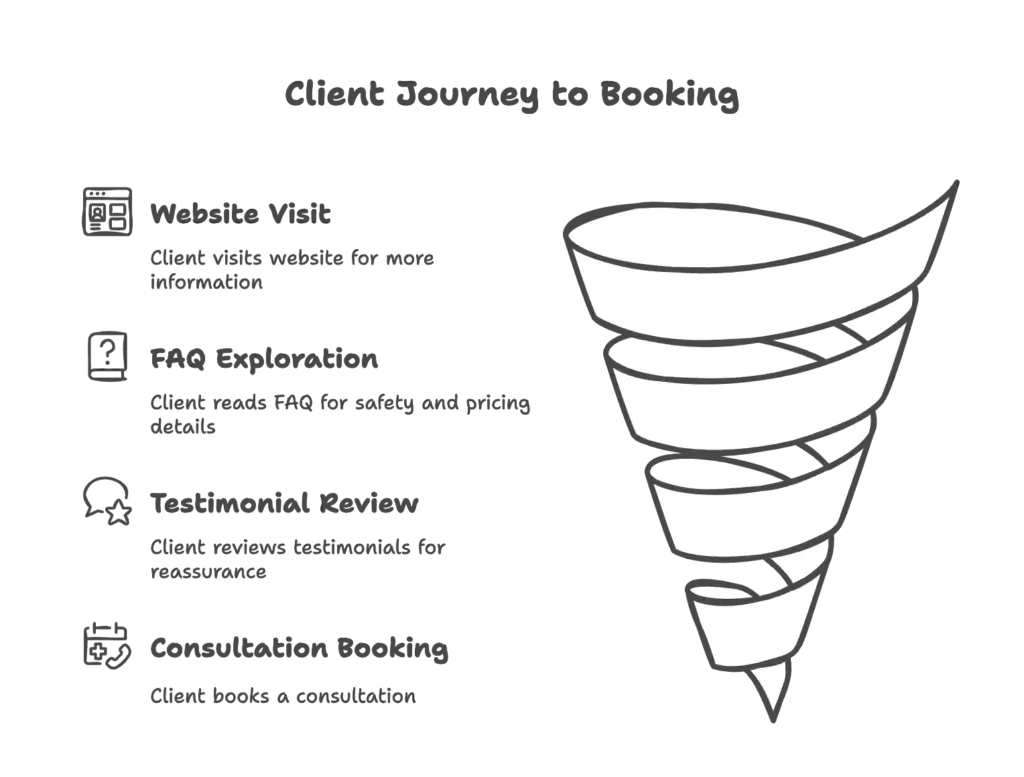
2. What is the customer journey from discovery to booking
Think about how a client finds you and what they need before they book.
For example, a client might find you on Instagram, visit your website to learn about your services, read reviews, check pricing or FAQ, and then book a consultation.
Your website should make this process simple and logical.
3. What is the number one action you want visitors to take
- Book a consultation
- Sign up for a trial
- Fill out a contact form
If you do not define this, visitors will leave without doing anything.
Day 3–4: Choose the right platform
For most small businesses, a simple and flexible setup works best. A common choice is WordPress with Elementor because it allows you to build a professional site without coding and can grow with your business.
The key rule here is simple. Do not build everything from scratch if you do not have to. Start with a template and customize it.
Day 5: Plan your pages before you design
A quick website launch does not mean skipping important parts. It means focusing only on what you actually need.
Most small business websites work perfectly with five core pages.
- Home page – who you are and what you offer, with a clear call to action
- About page – your story, experience, and why people should trust you
- Services page – what you offer and how to book
- Contact page – simple form, phone, or email
- Testimonials or portfolio – proof that your work gets results
Every page should guide the visitor toward the next step.
Step 2: Build without the overwhelm
Once you have a clear plan, building the website becomes much easier. You are no longer guessing, you are just filling in the structure you already defined.
Day 6–7: Branding and photos
You do not need expensive branding to look professional, but you do need consistency.
If possible, use real photos of yourself, your team, your space, or your work. This builds trust much faster than generic images.
If you do not have professional photos yet, you can combine simple typography, clean colors, and good quality stock or AI images to get a polished result.
Even a simple text logo with a clean font is enough to start.
Day 8–12: Build the site and focus on conversions
At this stage you set up the website, choose a clean template, add your content, and place your call-to-action buttons in the right places.
A website that converts is not about fancy design. It is about clear messaging.
On the homepage, visitors should understand in seconds who you are, what you do, and who you help.
On the about page, explain why you started your business and how you help clients.
On the services page, describe each service clearly and tell people how to book.
On the contact page, keep it simple. Form, phone, email, nothing complicated.
If writing feels difficult, you can use tools to help you rewrite text so it sounds clear and natural. The important thing is clarity, not perfection.
Day 13–14: Final checks and publishing
Before publishing, check a few important things.
- Does the site look good on mobile
- Do all buttons and forms work
- Does the site load quickly
- Is the main call to action easy to see
When everything looks good, publish it.
Your website is live, and that already puts you ahead of most small businesses that keep postponing it.
Final thoughts: get it live and improve later
If you have been stuck in overthinking, perfectionism, or fear of doing it wrong, this is your sign to stop waiting.
Done is better than perfect.
A simple, clear website works better than a complicated one.
You can always improve it later.
The important thing is to get your website online so people can find you, trust you, and book your services.